Duplicate: How do I duplicate a price list?

Table of contents

Duplicating a price list in the Stylish Price List plugin is quick and easy. Follow these steps:

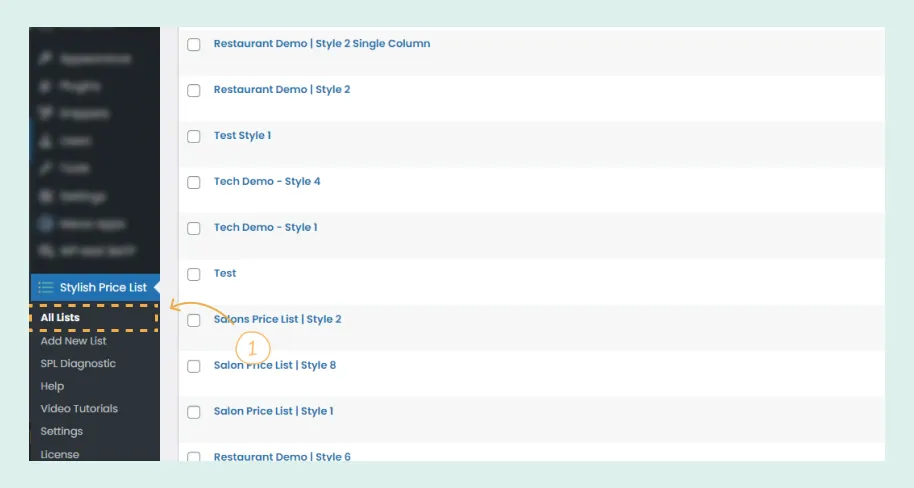
1. Access All Lists

  • Go to the WordPress dashboard.
  • Navigate to the “Stylish Price List” plugin options.
  • Click on “All Lists” to see all your created price lists.

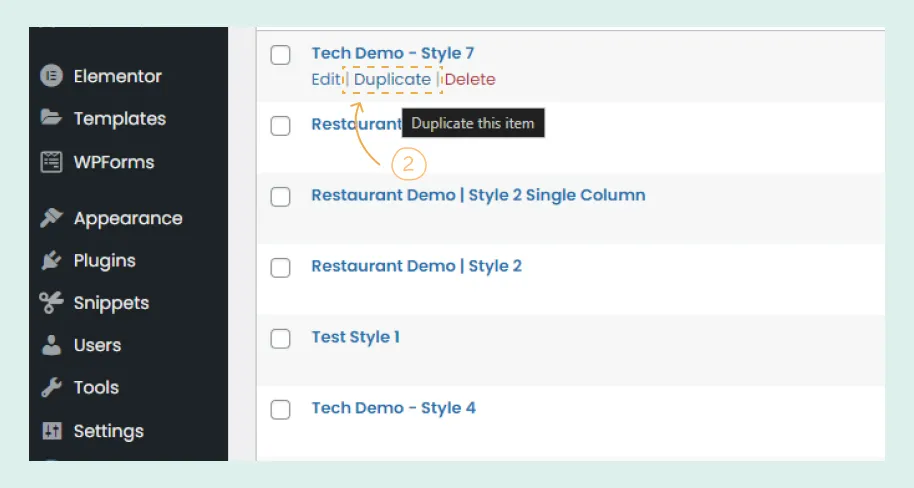
2. Duplicate the Price List

  • Find the price list you want to duplicate.
  • Click the “Duplicate” option next to it.
Duplicate the Price List Stylish Price List

That’s it! You now have a duplicate of your selected price list.

Table of contents

Build Beautiful Price Lists with WordPress

Create professional price lists, restaurant menus, and service catalogs in minutes. Drag & drop builder, mobile-friendly, QR code ready. Trusted by spas, salons, restaurants, and 2,500+ businesses worldwide.