Buy Now Button: How Do I open the links in a new tab?

Table of contents

Make your “Buy Now” links open in a new tab with these simple steps:

Step 1. Open Your Price List.

Access your instance of the price list in the Stylish Price List plugin.

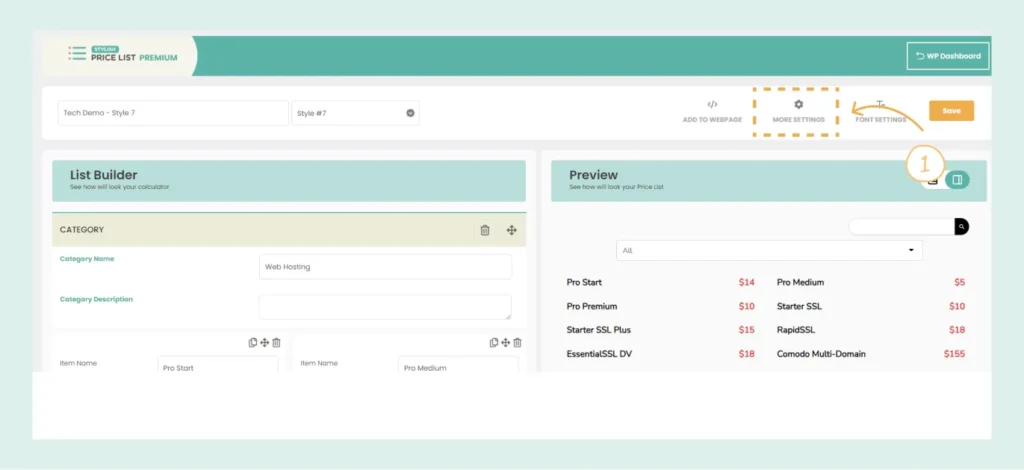
Step 2. Go to More Settings.

Click on the “More Settings” tab.

Stylish Price List Settings

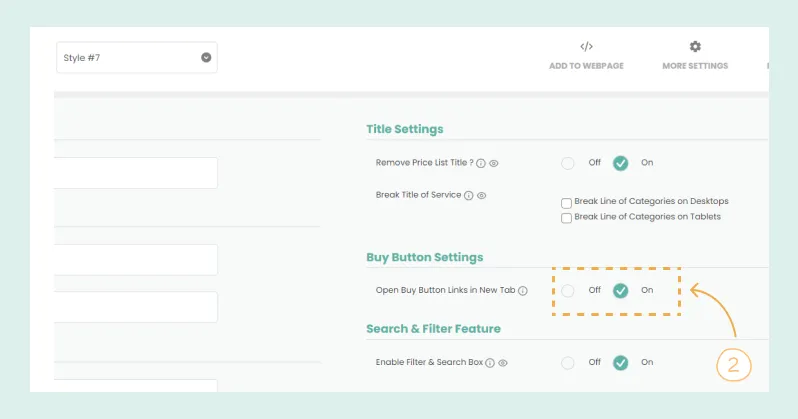
Step 3. Enable New Tab Option.

  • Find the option for “Open Buy Button Links in New Tab.”
  • Select “Yes” to enable it.

  • Your “Buy Now” links will now open in a new tab.
Buy Now Button Settings

Table of contents

Build Beautiful Price Lists with WordPress

Create professional price lists, restaurant menus, and service catalogs in minutes. Drag & drop builder, mobile-friendly, QR code ready. Trusted by spas, salons, restaurants, and 2,500+ businesses worldwide.